
Local Computer Mark Local Computer Staging Preview
Sections →
Hand-Held Walkthrough · Official Staging Preview

Connect your computer,
one authority at a time.

Local Computer creates an explicit bridge between your chosen files and your authorized AI assistant. Follow these six human-approved checkpoints to go from unfamiliar download to your first safe, verified read operation.

Agent-First Fast Track

Prefer to hand this setup guide directly to your AI assistant?

Provide your model with the official Staging Markdown contract. It inspects the guide and asks for your physical confirmation at every gate.

Read install.md ↗
Checkpoint 01 Platform bounds & verification

Before you begin

Local Computer is available exclusively for bounded Staging testing, not as an open production release. Before downloading or starting the local service, confirm your computer meets the active architecture criteria:

macOS Intel x86_64 Build 490

Signed with Apple Development certificate; not notarized. Also runs under Rosetta 2 on Apple silicon.

Linux x64 Headless Build 487

Tested on Ubuntu 24.04 LTS. Unsigned staging tarball. Windows release is deferred.

!
Staging environment rule: Staging identity, device registration, and OAuth authority always stay on Staging. Do not swap credentials across different testing environments. Check the active candidate catalog at /download/.
Checkpoint 02 Physical device registration

Install & authorize

Installation does not run hidden scripts behind your back. Every step is verifiable locally before you grant authority.

  1. 1
    Verify the download artifact Check that the downloaded archive matches the official SHA-256 hash published in install.md and the current Staging distribution catalog before unpacking.
  2. 2
    Run local runtime setup Launch the application. On macOS, review OS permission dialogs; on Linux, run the headless runtime service directly on localhost.
  3. 3
    Complete GitHub Device Flow When prompted, open GitHub's official Device Activation page and input the unique 8-character verification code displayed by your local machine. Never paste personal access tokens into third-party windows.
Checkpoint 03 Client OAuth pairing

Connect ChatGPT

Once your machine is registered as a verified Staging device, you pair it with ChatGPT or Claude through a standard OAuth handshake. GitHub Device Enrollment and ChatGPT Client OAuth are entirely separate authorities.

Two Independent Approval Gates

Revoking ChatGPT access never invalidates your machine enrollment, and signing out of GitHub never damages your local workspace files.
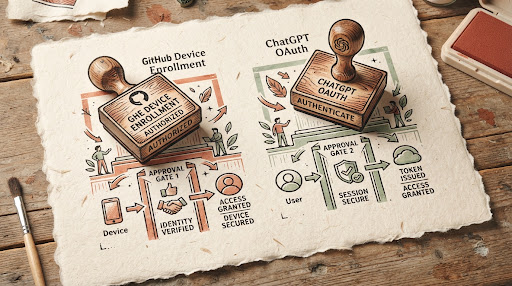
Illustration of separate GitHub Device Enrollment and ChatGPT OAuth Stamps
Diagrammatic craft: Two human-held stamps Independent cryptographic tokens

Connect ChatGPT to the intended Local Computer MCP server endpoint over HTTPS. The service challenges unauthenticated requests rather than opening arbitrary local network tunnels.

Checkpoint 04 Verified read-only milestone

Prove it with a small task

Always confirm that permission boundaries hold before executing substantive workflows. Start with a harmless read-only query inside one dedicated directory.

Recommended Test Scenario Read-Only Permission
Prompt to your assistant:
"Inspect the files inside my approved folder ~/Research/FieldNotes and summarize the core themes of the notes into a markdown list."

What to verify:

  • The agent can read files inside the explicitly selected path.
  • Attempting to read outside files (such as ~/.ssh or other folders) returns a strict access denied error.
  • No files are copied to cloud mirrors or secondary foreign databases.
Checkpoint 05 Clean departure & exit boundaries

Recovery, revoke & uninstall

Exit paths are distinct and not interchangeable. Stopping a background session is different from disconnecting OAuth or removing the software:

Disconnect Halts the active transport connection; does not assume the cloud Device record has been deleted.
Client Revoke Ends the client grant for ChatGPT or Claude. Other clients maintain separate authority.
Reset Local Clears local device identity and runtime cache while leaving your physical files completely untouched.
Uninstall Removes runtime binaries and manifests according to standard macOS Application or Linux directory removal.
Checkpoint 06 Human communication & staging triage

Feedback & support

We do not claim 24/7 automated tier support or fake compliance certificates. When reporting a Staging problem, include the exact build number, target operating system, and sanitized logs. Never transmit bearer tokens, private keys, or confidential document content.

Direct Lab Correspondence
hello@inkblocklab.com Direct Inbox