Independent Creators · Researchers · Private Files

Your desk is full of unfinished thinking.Finally, an assistant you can invite in.

Instead of dragging gigabytes of client drafts, audio transcripts, and photography archives to another application, Local Computer makes a clearly authorized way to work with selected files on your computer.

You choose one specific folder. You grant explicit, separate authorization. Your authorized AI agent conducts careful synthesis right where your files belong.

See an Example ↓
Requires explicit folder selection · Separate GitHub & ChatGPT authorization gates

Staging candidate for macOS Intel & Linux x64. Hand the setup prompt directly to ChatGPT or Claude.

Tangible Workspace Transition: Field Notes → Bound DossierEditorial Illustration
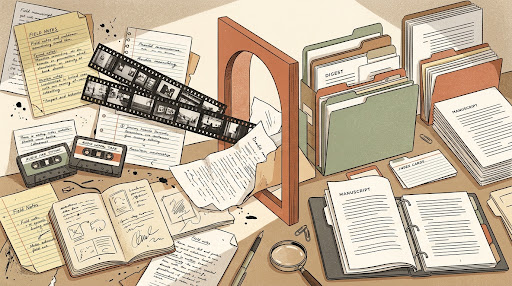
Editorial illustration of creative researcher desk transition

“From unindexed desk chaos to orderly synthesis, without exposing your physical drive.”

Folder: ~/Manuscripts/2026_Interviews
Illustrated Workflow & Consent

How Local Computer stays polite: A continuous narrative.

Traditional tools demand unrestricted access across your disk. Local Computer introduces clean human-held gates before any agent reads or organizes your work.

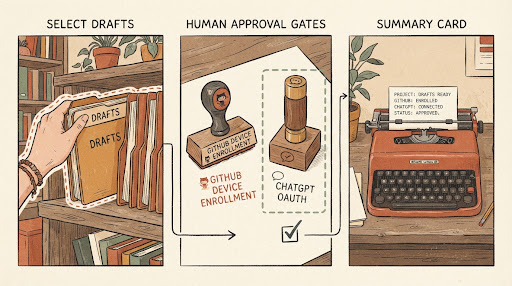
Workflow Diagram: Folder Choice → Two Approvals → Clean SynthesisDiagrammatic Editorial Illustration
Continuous narrative illustration showing folder selection, human approval gates, and typewriter summary card
1

Select the Folder

The person chooses one local folder on their disk (e.g. ~/Research/FieldNotes). Files outside that boundary stay completely untouched.

2

Two Distinct Approvals

The human approves device enrollment via GitHub Device Flow, and separately authorizes the ChatGPT OAuth connection. These two authorities never bypass owner consent.

3

Single Useful Outline

The model synthesizes notes into an indexed summary or bibliography card directly on your machine—never uploading full raw archives.

Note: These are diagrammatic editorial illustrations explaining the workflow, not simulated or claimed live terminal session logs.

Narrative Moment 3 · Tangible Outcome

A quiet Tuesday morning with messy field notes.

Suppose you have gathered dozen interview transcripts, book chapters, and research notes in your selected folder. Instead of copying sensitive field records into a remote cloud window, your assistant produces a clean, structured outline card right beside your work.

✓Reads only within your explicitly chosen directory boundary.
✓Generates indexed summaries or markdown notes saved locally.
✓Authorization is specific to each approved client and folder.
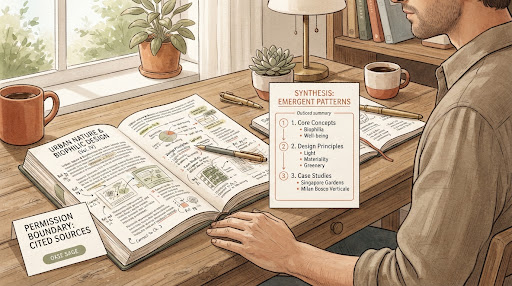
Desk Synthesis: Permission Boundary & Emergent Pattern CardEditorial Case Study
Warm editorial diagram of researcher desk with permission boundary and synthesis outline card
Boundary: Scoped Cited SourcesOutput: Local Markdown Synthesis
Agent-First Setup

Ready to try? Give this instruction to your AI.

Copy this prompt to ChatGPT or Claude. It directs the assistant to inspect the official staging guide and ask for your explicit approval before performing any local action.

Official Staging Agent Contract
Public Staging Candidate
Set up Local Computer Staging on this computer. Follow /agent/install.md . Identify supported OS and architecture, discover current release, verify SHA-256 before installation, preserve existing Device/OAuth connections, and ask me for exact approvals only when required. Do not treat Staging as a Production release.
View agent guide (install.md)|/download/|Explicit human approval required
Verified Transparency

Staging Release Boundaries

This is public Staging software. We publish exact compilation status and verified boundaries so you know precisely what is running on your machine.

macOS IntelBuild 490

Apple Development signed; not notarized. Passes in-place upgrade and ChatGPT MCP read checks.

Architecture: x86_64 / Rosetta 2
Status: Staging Candidate
Manifest: SHA-256 in official install.md
Linux x64Build 487

Unsigned Staging tarball tested on Ubuntu 22.04 LTS and Debian 12.

Architecture: x86_64 headless socket
Status: Unsigned Staging tarball
Manifest: SHA-256 in official install.md
Windows x64Deferred

Deferred. Filesystem separation and sandboxing are in planning.

Architecture: Windows NT
Status: Deferred post-v1.0
Verification: In engineering validation
Preview Deferred
Staging Transparency Notice: Always verify downloaded bundle checksums against the official SHA-256 digests in install.md and GitHub release records before executing binaries on your machine.